 RouteAll
Check A Multi-State Permit Packet
Workflow reviewed October 23, 2026 against RouteAll’s upload and review implementation. State-specific authority is linked separately.
Plan a multi-state oversize route as a chain of permits: each state the load crosses usually issues its own, and the last permitted road in one state must meet the first in the next. RouteAll reads up to 6 state permits for one trip and builds one GPS route across them for you to check against each permit.
On This Page
- Collect every state’s permit with its route pages, amendments and conditions.
- Match each permit to the truck: the actual loaded dimensions, weights and dates.
- Join the routes at every state line: same crossing, same direction.
- Upload the permits to RouteAll and check every road it read against each permit.
- Share the reviewed route with your escorts, then confirm it.
Treat the packet as a chain of separate authorizations. Match each issuing state, actual truck, dates, highway sequence and conditions. Then compare the road leaving one state with the road entering the next. Resolve any gap before building the navigation route.
Which Documents Belong To Each State?
Group each issued permit with its route pages, amendments and incorporated conditions. Identify the authority printed on the document instead of trusting the filename. A packet can include inspection instructions, receipts or another state’s cover sheet alongside the permit. Read the header of every part before using it.
Our private sample review found a file named for New Hampshire that contained New Hampshire inspection guidance and a Maine permit. The useful lesson is the document check, not the filename. No original customer packet is reproduced here.
- Issued authority: Find the agency and the permit type.
- Route pages: Match each sequence with the correct permit.
- Conditions: Retain every referenced restriction sheet.
- Amendments: Identify which version replaces an earlier one.
Use the 50-state permit-reading directory for the correct issuing agency and document distinctions.
How Do You Check The State-Line Handoff?
Compare the last authorized road in one state with the first authorized road in the next. Verify the crossing, direction and road connection. A matching destination city is not enough. The gap may be a ramp, local road or separate bridge authority that needs its own review.
Make a boundary note for each crossing. Keep it short enough for the crew to read during the parked pre-trip briefing.
| Check | Departing State | Entering State |
|---|---|---|
| Road | Final authorized segment | First authorized segment |
| Direction | Travel toward the crossing | Correct carriageway after crossing |
| Timing | Window still open | Window already open |
| Crew | Escort reaches agreed handoff | Required escort ready |
If those entries do not join, ask the responsible permit authority to resolve the gap. A waypoint you add privately does not create authorization.
Do All Permits Describe The Same Truck?
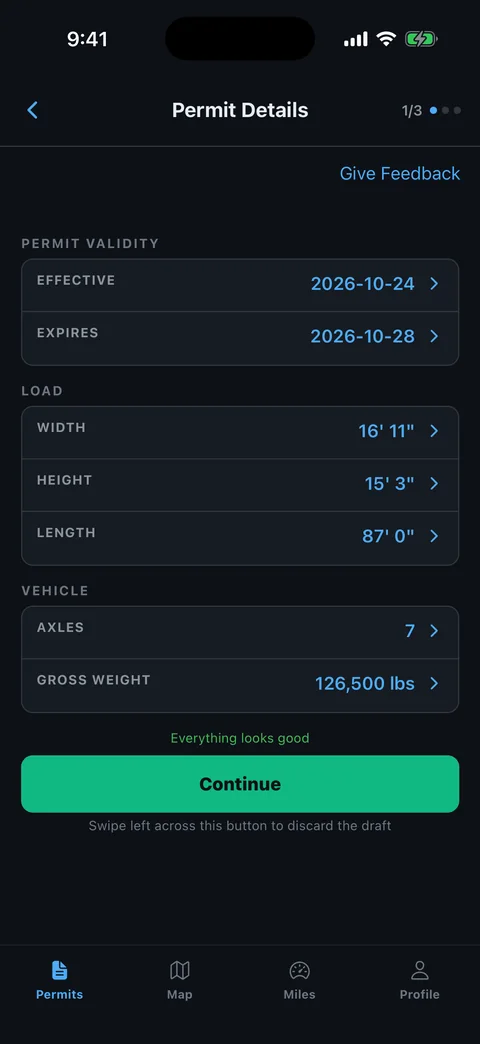
Compare each permit with the actual loaded combination, rather than comparing the permits only with each other. A dispatch change can leave several documents consistently wrong. Check dimensions, equipment and weights after the load is secured, then identify every authorization affected by a difference.
- Equipment: Compare the actual tractor, trailer and configuration with the stated fields.
- Dimensions: Use the loaded measurement, including relevant overhang and projecting equipment.
- Weights: Distinguish gross weight from axle or group limits.
- Dates: Check the effective and expiration fields separately from the issue date.
A smaller stated dimension is not a harmless clerical error. Read common state-permit errors before sending a corrected packet for review.
Which Conditions Control Your Schedule?
Build the schedule from each permit’s actual travel conditions. Expiration tells you when the authorization ends; it does not mean every hour before that moment is available. Check movement windows, restrictions and escort coordination for the route sections where they apply. Keep any exception with its conditions.
Put the limiting condition next to the affected section in your movement notes. A bridge instruction belongs with that bridge. An escort change belongs with the agreed handoff. A closure belongs with its exact location and time.
The travel restrictions guide explains the types of conditions to look for. Read the issued state documents for your actual windows.
Leave room to stop safely if the next state’s window has closed. Do not assume that arriving at a boundary before expiration permits onward travel immediately.
How Do You Load The Packet Into RouteAll?
Use a readable PDF and keep the full permit package available while reviewing the extracted route. RouteAll’s implementation accepts one PDF, which may contain several states. The current implementation allows multi-state processing with RouteAll Pro or an available free or purchased trip credit. Separate-PDF bundles contain two to six documents. The in-app credit and file checks determine what your account can submit.
Follow the permit-to-GPS workflow and inspect the result before confirmation. File count and state count are different concepts; uploading six files does not prove all required states are covered.
- Prepare the packet. Use current documents and remove unrelated duplicate versions from your working set.
- Upload the files. Follow the app’s current allowance and size checks.
- Review extraction. Match the state, roads and dimensions with each source document.
- Check the joins. Compare each state boundary with the written authorizations.
- Confirm deliberately. Resolve a missing road or ambiguous instruction before navigation.
RouteAll assists with reading and following the permitted roads. It does not issue a missing permit or approve a route gap. Create a free account to try it on your packet, or read the plain facts about RouteAll.
What Changes When An Amendment Arrives?
An amendment can change more than the line on a map. Recheck its route, conditions, dates and any handoff with neighboring permits. Replace the crew’s outdated working version. Tell each escort what changed and compare the route again before restarting the affected movement.
Identify whether the new document replaces the whole packet or changes one part. Keep the authority’s instructions about the unchanged pages. Do not discard referenced conditions merely because the amended route fits on a single sheet.
Use RouteAll’s free pilot car route sharing for the updated briefing. Confirm the escort is viewing the route corresponding to the current permit; a previously sent link is not evidence that every amendment has been reviewed.
The Packet Check In One Minute
For a multi-state move, separate the documents by their printed issuing authority. Keep route pages and conditions with the permit they belong to. Compare every state’s document with the actual loaded truck. Then check the roads at each boundary, including directions, ramps and any separate authority. Build your schedule from the written movement conditions, not just the permit’s expiration date. In RouteAll, one PDF may contain several states, while separate PDF bundles and multi-state routing depend on an available trip credit or eligible plan. Review every extracted section before confirming it. If an amendment arrives, recheck the affected joins and brief the escort crew again. The app helps you follow a reviewed route; the issuing authorities still control what you may drive.
Common Questions
Do I need a separate oversize permit for each state?
Usually, yes. Each state issues oversize permits for its own roads, so a trip through three states normally needs three permits. Check with each issuing state before you book the load.
Can one app route a trip across several state permits?
Yes. RouteAll reads up to 6 state permits for one trip, from one PDF or separate PDFs, and builds one GPS route across them. Multi-state trips use an available trip credit or an eligible plan. Check each state's roads against its permit before driving.
What if the permits do not connect at the state line?
Do not fill the gap with a road of your choosing. Ask the issuing state to resolve it, because a waypoint you add does not create authorization.
Is a multi-state trip free in RouteAll?
Every account gets one free trip a month, covering up to 6 state permits, with no card to start. More trips need a 3-Trip Pack or a subscription such as RouteAll Pro.
Before You Roll
Do not leave an unexplained gap between permits. Resolve the road, timing or authority conflict first, then give the entire crew the same current packet and reviewed route.
Further Reading
- Read Your State’s Permit
- Prepare A Readable Permit PDF Or Scan
- Share The Reviewed Route With Your Escort
Sources And Scope
Product facts were checked in RouteAll’s upload, permit-bundle and review implementation. The private sample review illustrates a document-handling problem; it does not establish current state law. Follow the official sources in each linked state guide for legal requirements.