 RouteAll
Share The Route With Your Pilot
Last verified October 22, 2026 against the RouteAll app source.
The lead driver shares the permitted route with the pilot car by link. The escort opens it with no account and no subscription, sees the route and the step list, and can follow it with off-route warnings. The link expires, and the driver can stop sharing at any time.
On This Page
Here is what each side does, and what the escort sees.
In one minute: the pilot car drives the route first, so the escort needs the same roads the truck is permitted on. A screenshot has no turns in it. A shared RouteAll route carries the permit's route line and step list, and it cannot be edited from the escort's side.
The escort pays nothing to open it.
How does the driver share the route?
From the confirmed route in the RouteAll app, the driver taps share and sends the link to each escort. The route has to come from the permit first, checked against the paper. Sending a share is free on every plan, and opening one is free too. Neither side needs RouteAll Pro.
- Upload and check the permit, as in how to turn a PDF permit into a GPS route.
- Confirm the route once every road matches the paper.
- Share the link with the lead and chase cars.
- Turn on progress sharing if you want the escort to see how far along the truck is.
What does the escort see?
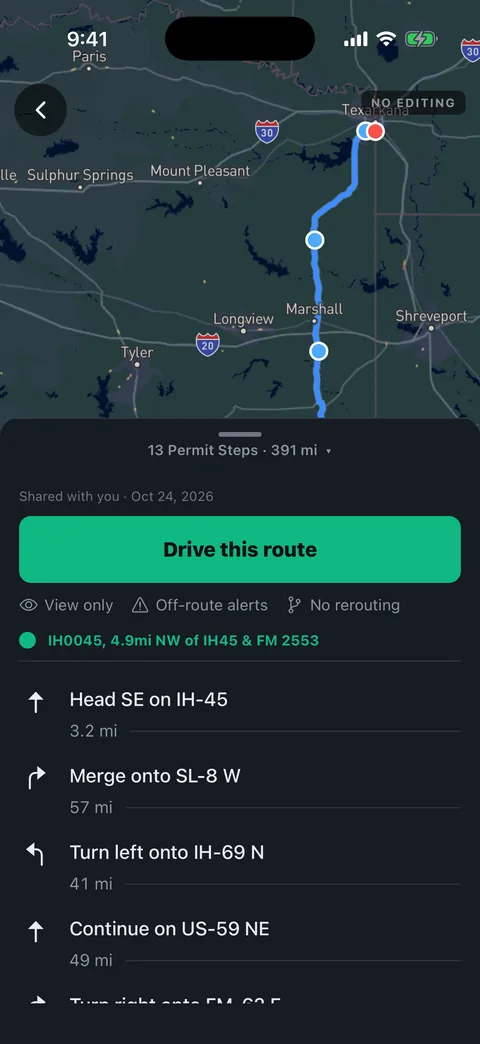
In the RouteAll app, the escort sees the permitted route on the map, the origin and destination, the total distance and the step list. No account is needed, and the route is the same signed in or not. In a web browser the link shows a short preview, so the escort opens it in the app to drive it.
The two views side by side:
| What the escort gets | In the RouteAll app | In a web browser |
|---|---|---|
| Route line on the map | Yes | No |
| Origin, destination, distance | Yes | Yes |
| Step list | Yes, every step | Step count only |
| Follow mode with off-route warnings | Yes | No |
| Truck progress, if the driver turns it on | Yes | No |
Can the escort follow the route?
Yes. In the app, the escort can switch to follow mode: live GPS on the same line, progress by section, and a warning when they leave the route. It runs the same off-route check as the driver's own app. It never draws a new road, because a new road is not on the permit.
Only the driver who sent the route can change it.
Follow mode is view-only. The escort cannot edit the pins, the steps, the mileage or the trip status.
Can the escort see where the truck is?
Only if the driver turns on progress sharing for that trip. The escort then sees how far along the permitted route the truck is. What is shared is a position along the line, not a raw GPS track. It is marked stale after 90 seconds without an update, so an old position never looks live.
If the driver never turns it on, the escort sees the route and no truck.
How long does a shared link last?
Thirty days by default. After that the link stops working and shows Route no longer available. The driver can stop sharing earlier from the app at any time, and the link stops the same way. Ask for a fresh link if the haul is more than a few weeks out.
Stopping turns the link off for everyone it was sent to, not just one escort.
What does the shared link leave out?
It carries the route and the steps, nothing more. It does not carry the permit number, the travel rules, or the sender's name or account, and the escort cannot edit anything. Without progress sharing, there is no truck on the map. Each of these is deliberate, and the escort still needs the permit itself.
A shared route is not the permit. The escort must still read the permit's travel rules and dimensions.
Who pays for route sharing?
Nobody. Sending a share is free on every plan, including the free one, so the driver does not need RouteAll Pro for it. The escort pays nothing to open, view or follow the route, and needs no account. One escort working for five haulers should not need five subscriptions to see five routes.
The full argument is in why your escort driver should not need a subscription.
Before you roll
Send the escort the permit and the shared route, not one or the other.
The permit carries the travel rules. The shared route carries the turns. Agree the radio channel, and confirm the load's width and height out loud before the first mile.
Common questions
Does the pilot car need a RouteAll account?
No. The link is the credential. Anyone holding it can open the route in the RouteAll app with no account and no charge, and follow it with off-route warnings. A web browser shows a short preview only.
Can I stop sharing a route?
Yes. The driver who shared the route can stop sharing from the app at any time, and the link stops working for the escort. Links also expire on their own, 30 days after they are created by default.
Does the shared route reroute the escort?
No, on purpose. The escort gets a warning when they leave the permitted line, and nothing else. A new road would not be on the permit, and only the driver who sent the route can change it. RouteAll does not issue permits or guarantee compliance.
Can the escort see the truck's location?
Only if the driver turns on progress sharing for that trip. The escort then sees a position along the permitted route, not a raw GPS track. It is marked stale after 90 seconds without an update.
Further reading
RouteAll reads the permit you provide. It does not issue permits or guarantee compliance. The driver remains responsible for the load. Product behaviour described here was checked against the app source on October 22, 2026 and may change.