 RouteAll
Louisiana Permit Reading Guide
Sources Reviewed: October 23, 2026
Read a Louisiana oversize permit by matching the vehicle and load, then tracing its approved route and movement conditions. For annual heavy-equipment permits, check whether a separate registered route covers this move. Keep the complete authorization available before entering Louisiana or beginning the trip.
On This Page
What Belongs in Your Louisiana Permit Package?
Keep the issued permit together with every route approval and condition referenced by it. An annual permit and a registered route answer different questions: what your authorization covers, and where the particular movement may go. A receipt or submitted application does not answer both.
The Louisiana DOTD truck permit page says new annual oversize/overweight heavy-equipment permits require registered-route approval before each move. Registration follows annual-permit issuance through LaGeaux or the office. Do not treat the annual document alone as your trip instructions.
- Issued permit: Check permittee, equipment, load, and effective dates against this dispatch.
- Registered route: Confirm the approved movement matches this load and destination.
- Conditions: Keep routing notes, special requirements, and referenced material with the driver.
Ask dispatch for missing pages before scheduling an escort. Read annual versus single-trip oversize permits if the packet contains several authorization types.
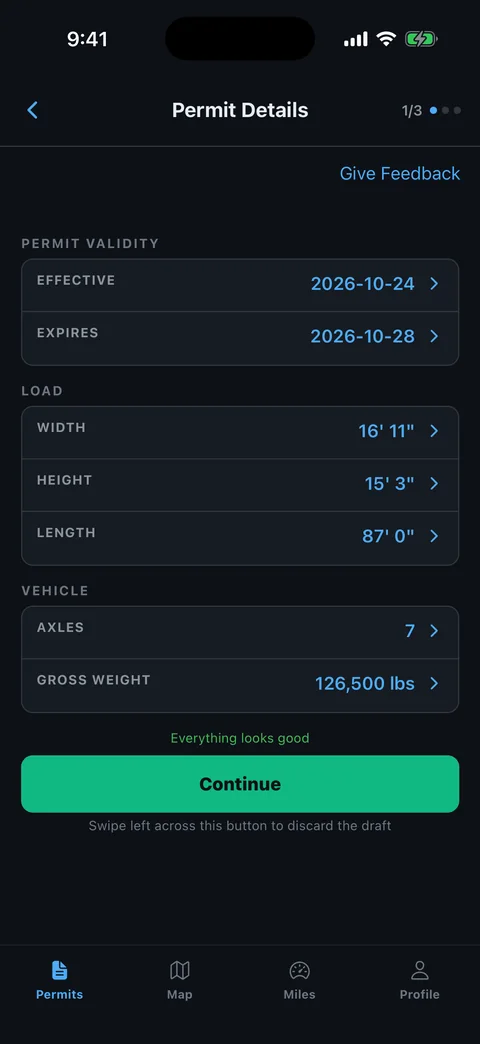
Which Vehicle and Load Details Need a Second Check?
Compare the permit with the loaded combination you will actually drive. A correct company name cannot compensate for an incorrect configuration or measured dimension. Start with the equipment, then check the cargo and the resulting overall dimensions.
DOTD's oversize and overweight permit regulations explain that permits belong to the designated permittee and that construction-equipment applications require equipment identification. Use the issued fields, rather than a broker's shorthand description, when resolving a mismatch.
- Equipment: Compare tractor, trailer, and equipment identifiers where provided.
- Dimensions: Check the loaded height, width, length, and any projecting equipment.
- Weights: Compare gross and axle information with the authorized configuration.
- Identity: Make sure the carrier and load descriptions describe this movement.
Record the discrepancy precisely. “Trailer changed” is less useful than identifying which field differs and whether the configuration changed too.
How Do You Read the Approved Highway Sequence?
Trace the permitted route from its actual starting point to its actual endpoint before following a map. Treat every highway change, direction, ramp, and written instruction as part of that sequence. A familiar road number can still lead to the wrong carriageway or crossing.
Make a simple movement sheet with the permit beside it. Write the entry point, each highway transition, any location-specific instruction, and the final authorized road. Then trace those items on the map in order. Keep route annotations outside the permit document.
- Entry point: Match the Louisiana route with your approach from the previous state.
- Transitions: Check which ramp or intersection connects consecutive highways.
- Endpoint: Identify where written authorization stops and site access begins.
- Return movement: Confirm its authorization separately rather than reversing the route yourself.
A useful handoff states the final Louisiana road and the next jurisdiction's first authorized road. Do not hide an unexplained gap between them inside a navigation waypoint.
Which Louisiana Restrictions Need a Fresh Check?
Check the route against current restriction information, even when the permit was issued recently. DOTD provides a Trouble Board, Route Planner, and posted-bridge resources from its official permit page. Those resources support your review; they do not amend the issued route.
Focus on the exact portion you will use, including approaches to bridges and the destination. A county name or long highway corridor is too broad when a restriction affects one structure or work zone.
- Location: Compare highway number, direction, and restriction limits.
- Type: Separate height or width clearance from a weight restriction.
- Timing: Check whether the restriction overlaps your intended movement.
- Response: Refer conflicts to the permit office before entering the affected section.
Keep the time of your last check in dispatch notes. If an issue appears after departure, communicate your safe stopping location and the affected permit segment instead of proposing an unapproved shortcut.
What Do Special Conditions Change About the Trip?
Special conditions can control how a permitted movement takes place, including its time, speed, routing, and escort arrangements. Read those instructions before estimating arrival time. The route alone does not describe the complete move.
The DOTD regulations allow permit-specific requirements such as escorts and other support. Turn each applicable instruction into a practical check: who supplies it, where it starts, and what must be ready before that segment.
For example, an instruction affecting a particular crossing should be attached to that crossing in your briefing. A general note at the end of an email is easy to overlook when the crew reaches the structure.
- Travel window: Identify the movement hours and any applicable exceptions.
- Support: Confirm escort or other coordination required by the permit.
- Structure notes: Read location-specific speed or operating instructions completely.
Use the pilot-car route-sharing guide to brief the same route with escorts. Shared navigation does not replace their required instructions.
How Do You Resolve an Error or Route Conflict?
Ask the Truck Permit Office to resolve permit errors and route conflicts before using the affected authorization. DOTD states that revisions and cancellations are at the office's discretion. Editing a PDF, changing a waypoint, or receiving a shipper's revised address is not that decision.
- Identify the issue: Name the incorrect field or exact highway segment.
- Describe the move: Have current vehicle, load, dimension, and weight information ready.
- Explain the location: Give the proposed origin, destination, and any restriction involved.
- Obtain the response: Keep the revised issued material or explicit office instructions.
- Replace working copies: Recheck the driver's packet and escort briefing against the same version.
Leave enough planning time for office review. Do not promise a same-day amendment based on how quickly a previous permit was processed. The official contact page gives the current office channels and notices.
How Can You Check the Route in RouteAll?
Use RouteAll to turn readable permit text into a route you can review, while keeping the issued Louisiana documents as the authority. The PDF-permit-to-GPS guide explains extraction and the manual review required before navigation.
Compare the extracted route with the actual LaGeaux-approved highway sequence. Check the start, every transition, any repeated road number, and the last authorized section. Review text that could be mistaken for a route, including office addresses and unrelated permit notes.
Read special conditions separately. A map line cannot communicate every timing instruction, equipment condition, or requirement affecting a bridge. Keep those instructions available to the crew.
If the map differs from the permit, resolve the difference before starting navigation. RouteAll does not issue permits, register Louisiana routes, or approve departures from an authorized route. Its value here is making the written route easier to follow after you have checked it.
Once the approved Louisiana highway sequence is clear, follow the oversize permit route turn by turn and recheck restrictions on the day you move.
The Permit Check In One Minute
For a Louisiana move, begin with the issued permit and check whether your annual heavy-equipment authorization also needs an approved registered route. Compare the actual truck, trailer, and load with the document. Trace each highway transition from the stated origin to the destination, then check current DOTD restriction resources. Read special conditions before you schedule the move or brief escorts. If a field, road, or condition does not fit, send the exact problem to the Truck Permit Office and keep the office response with the updated packet. RouteAll can help you review an extracted permit route, but you still need to compare it with the issued directions. A navigation change cannot register or amend a Louisiana route.
Before You Roll
Confirm the correct permit and any required registered-route approval belong to this movement. Resolve discrepancies with DOTD before using the route, then give every crew member the same current instructions.
Further Reading
Sources And Scope
This guide explains how to read the state’s published permit material. Your issued permit and incorporated conditions govern the move. Check the linked agency material for updates.
- Oversize and Overweight Truck Permits — LaGeaux, new annual heavy-equipment registered-route requirement, official restriction resources and office channels.
- Oversize and Overweight Permit Laws and Regulations — Permit possession, permittee, equipment details, special conditions, revision discretion, and qualified reasonable access.