 RouteAll
Arizona Permit Reading Guide
Sources Reviewed: October 23, 2026
Read an Arizona oversize permit by identifying its class, approved vehicle and load, route, dates, and special conditions. Class A and Class C have different scopes. Check ADOT’s route restrictions and local-road permissions before using the permit to prepare navigation.
On This Page
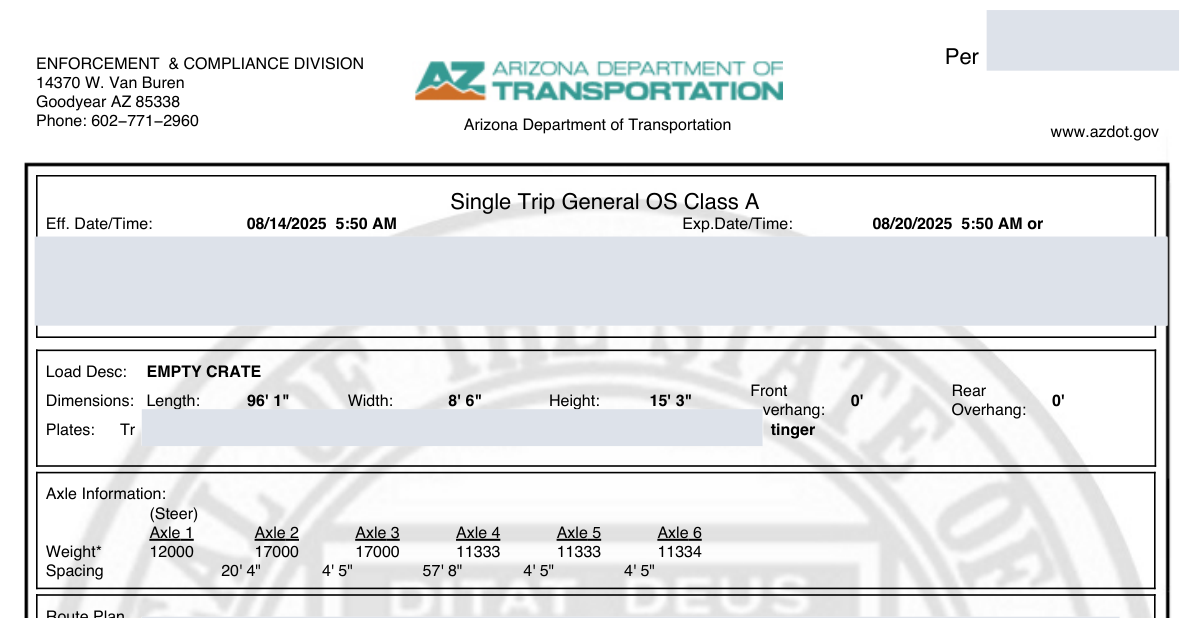
Is Your Arizona Permit Class A or Class C?
Find the permit class before applying a general Arizona rule. Class A covers qualifying vehicle and nonreducible load combinations within ADOT’s published envelope. Class C addresses movements outside that ordinary Class A scope. The class helps identify which instructions you must read.
The Class A permit page lists eligibility and duration options. The Class C procedures describe a different review path. Do not transfer a travel assumption from one class to another because both documents say oversize.
Write the class at the top of your planning sheet. Then compare the issued allowance with the loaded combination, rather than checking only cargo dimensions. Read a special mobile-home or other named permit as its own category when one appears.
Which Dimensions Must Match the Loaded Combination?
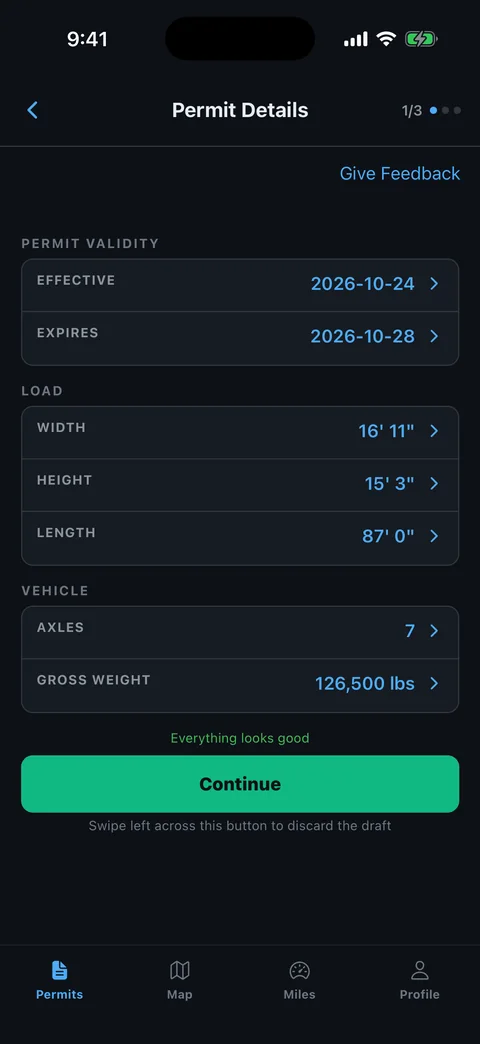
Compare the complete loaded truck and trailer with the document. The load description, overall width, height, length, weight, and listed configuration should describe the equipment that will actually travel. A cargo manufacturer’s drawing may omit trailer height or a projecting attachment.
- Overall height: Check the loaded position and measurement reference.
- Overall width: Include the widest part that will remain during travel.
- Length and projections: Preserve separate overhang information where shown.
- Weight distribution: Read axle information as well as the total.
- Load identity: Match the specific item, rather than a broad equipment category.
Use a measurement worksheet for discrepancies. The common permit-errors guide explains why rounding or dropping a field can change the movement.
How Do You Read the Route Against Table 4?
Read the approved road list together with ADOT’s highway-specific restrictions. The Class C resources include Table 4 route restrictions. A road number alone cannot explain every location-dependent condition that may apply to the permitted vehicle. Open the current restriction resource through the ADOT Class C page.
Match the precise highway segment, direction, and stated limitation. Keep any special instructions issued for your movement beside that comparison.
Build a short segment list with road, entry, exit, and condition. Preserve a temporary connector or repeated road instead of smoothing the route into one familiar corridor. If you cannot tell which segment a condition addresses, ask ADOT before deciding it is irrelevant. The permitted-route planning guide shows a practical review method.
Where Does the Arizona State Permit Stop?
Check road ownership at the pickup, delivery, and each connection outside the state system. ADOT states that Class A permits cover state routes and directs other-road permits to the proper local authority. Its Class C instructions likewise distinguish state and Interstate highways from local roads.
The ADOT routing contacts include local county and city information and a Phoenix permit link. Use the responsible authority for the actual road, rather than treating the delivery city’s name as proof of coverage.
For a yard entrance reached by a city street, mark the junction where ADOT’s road ends. Confirm the local movement up to the site separately. A navigation route that reaches the address does not answer whether every jurisdiction has authorized the loaded combination.
What Does the Permit Say About Nights and Weekends?
Read the issued movement window and any special permission before scheduling an early start or weekend arrival. Arizona’s Class C procedure describes requesting specified night or weekend movement for eligible routes and loads. That request process does not mean every Class C permit authorizes those hours.
Consult the Class C movement instructions and the actual approval. Identify dates, hours, route limitations, and any escort scheduling conditions. A comment entered with an application is not a substitute for the permission ultimately issued.
Plan where the truck can wait before a restricted section. Tell dispatch and the escort crew which condition controls the next departure. The travel-window guide can help turn separate restrictions into a workable schedule.
What Should You Recheck Before Leaving?
Recheck the route near departure rather than relying only on the day the application was prepared. ADOT’s Class A page links ePRO Trip Evaluation, AZ511, and state maps. Those resources address different questions: permit-route evaluation, changing traffic conditions, and road location.
Use ADOT’s official routing resources to review the same roads printed in your permit. If a closure or restriction conflicts with them, request instructions or a corrected route. Do not silently accept a passenger-car detour.
- Confirm the version: Open the latest issued document.
- Review conditions: Check the relevant route segment.
- Resolve conflicts: Obtain official direction before departing from authority.
- Brief the crew: Replace obsolete route notes and screenshots.
How Can You Review the Arizona PDF in RouteAll?
Use the PDF-to-GPS workflow to read the issued permit and review RouteAll’s proposed facts. Compare class, state, dimensions, route order, and endpoints with the source. Pay particular attention to an Arizona state-highway number that shares digits with a US highway.
Confirm the route only after you understand discrepancies. RouteAll assists navigation preparation; ADOT remains the authority for the permit and amendments. Keep Table 4 information and any local permission available with the original documents.
When escorts are involved, the route-sharing guide helps you discuss the same reviewed path. Brief the permit’s movement conditions alongside it.
When the Arizona route matches Table 4, follow the oversize permit route turn by turn and watch for a state route that shares digits with a US highway.
The Permit Check In One Minute
An Arizona permit review starts with the class. Class A and Class C are different approvals, so read the conditions that belong to the document you hold. Compare the loaded vehicle’s dimensions and configuration with the printed facts. Follow the road sequence and check the relevant highway restrictions, including the Table 4 resource where applicable. State authority does not automatically cover a city street leading to a yard. Confirm local permission and any night or weekend authorization before scheduling the move. Recheck ePRO and AZ511 resources before departure. RouteAll can help read the PDF and present a route for your review, but it does not issue or amend Arizona permits.
Before You Roll
Check the permit class, exact road list, and applicable restrictions together. Resolve any local-road or travel-window gap before treating the Arizona route as ready to drive.
Further Reading
Sources And Scope
This guide explains how to read the state’s published permit material. Your issued permit and incorporated conditions govern the move. Check the linked agency material for updates.
- ADOT Oversize/Overweight Permits — Class A scope, local authority and routing resources.
- ADOT Class C Permits — Class C procedure, road jurisdiction, special movement requests and Table 4 resource.
- ADOT Rules and Regulations — Official administrative rule source.