 RouteAll
Tennessee Permit Reading Guide
Sources Reviewed: October 23, 2026
Read a Tennessee TNTRIPS permit beyond the fee section: TDOT says load-specific restrictions are usually on page two. Match the vehicle and dimensions, trace the approved roads, and separate state or federal highway authority from local-road access. Check the issued restrictions before scheduling the move.
On This Page
Where Are Tennessee’s Permit Restrictions?
Look after the fee section for Tennessee's permit restrictions, usually on the second page. The TDOT permit FAQ says those restrictions are specific to the permitted load and route. Do not finish reading when you reach the payment amount or first route page.
Collect the entire issued file before checking the trip. If dispatch sends images, confirm that they include the lower portion of each page and all continuation pages.
- Current permit: Confirm you are reading the issued copy for this movement.
- Fee section: Continue into the restrictions that follow it.
- Supporting document: Keep any survey or traffic-control instruction named for the trip.
- Readable file: Replace blurry or cropped pages before reviewing the route.
A familiar road list does not establish familiar conditions. Keep the restrictions attached to this permit when preparing the driver and escort briefing.
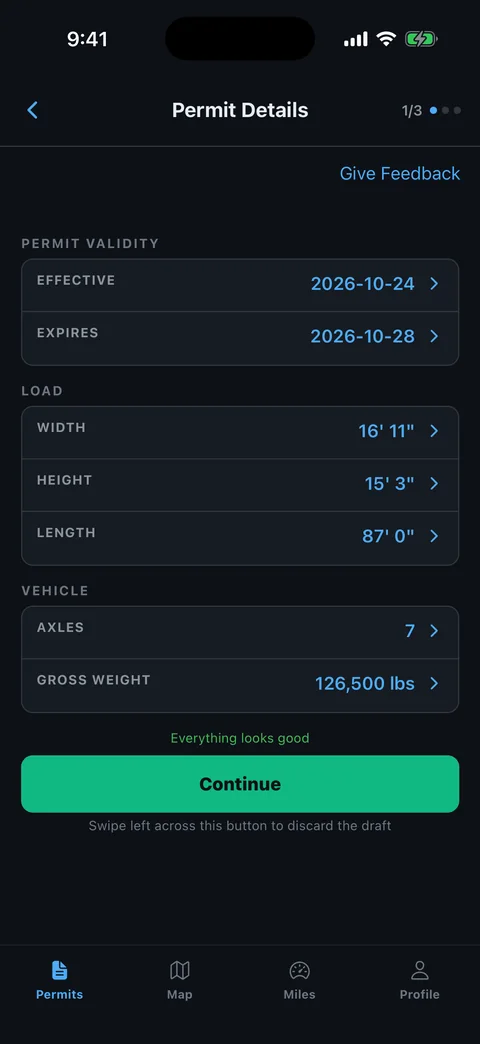
Which Tennessee Permit Values Need Comparing?
Compare the TNTRIPS document with the equipment and load that will actually depart. Start with carrier and vehicle identity, then check the measured dimensions and axle arrangement. A permit copied from an earlier movement still needs a complete review.
Read each number in its printed unit. Keep overall loaded dimensions separate from cargo dimensions and trailer length, especially when the load projects beyond the deck.
- Equipment: Match the truck and trailer identifiers shown.
- Size: Check transport height, width, overall length and any overhang.
- Weights: Compare gross, axle weights and spacings rather than checking only the total.
- Travel period: Read the actual effective and ending dates.
- Load category: Confirm the described object matches the cargo and permit type.
Use our common permit errors guide to record a mismatch. Supply the measured correction when contacting the issuer.
Does A Tennessee Route Listing Cover Local Roads?
No. TDOT says its permit covers state and federal roads, even though it requests the full route, including local access, to evaluate the move. Read the official local-road explanation before treating a listed destination street as a grant of local authority.
Trace the actual approach from the last approved highway to the receiver. Identify the authority responsible for any locally controlled segment and ask what permission the movement requires.
- Find the transition: Locate where the route leaves the state or federal road.
- Confirm ownership: Identify the authority responsible for the access street or connecting road.
- Match permission: Keep the applicable local authorization or clarification with the permit package.
- Review the entrance: Compare the planned approach with the receiving site's actual access.
Our permitted-route planning guide helps organize this final-mile review without replacing the local authority's decision.
How Should You Read A TNTRIPS Route And Survey?
Review the approved route rather than assuming a requested route was accepted unchanged. TDOT's FAQ distinguishes predefined TNTRIPS routes from routes submitted for agent review. It also explains that bridge analysis depends on axle loading and spacing as well as total weight.
Use the TDOT resources and policies to locate survey and traffic-control forms when the issuer requires them. Keep those supporting documents associated with the load configuration that was evaluated.
- Approved sequence: Read each road, direction and connecting segment in order.
- Survey scope: Check the route, direction and load dimensions covered.
- Special operation: Identify escort, traffic-control or bridge instructions.
- Departure plan: Confirm any meeting or coordination task before entering the affected segment.
Use the pilot-car route-sharing workflow to discuss the approved trip with the crew. It does not replace survey work or an officer escort requirement.
Can You Amend A Tennessee Permit Yourself?
Some Tennessee amendments are available in TNTRIPS, but eligibility depends on the permit and change. TDOT's amendment FAQ explains the available limits. Ask the permit office about a correction that falls outside the published process instead of altering the issued document.
Separate a change to account details from a change to the movement. Updating the company record does not establish that every active route, vehicle or date has been corrected.
- State the difference: Identify the exact vehicle, dimension, route or date needing review.
- Check eligibility: Read the current amendment instructions for that permit type.
- Request correction: Use the official process or ask the permit office for direction.
- Reprint and compare: Review the resulting issued copy, including the restrictions after the fee section.
Update the driver's and escort's copies together. Retire the superseded version so the crew does not begin with competing instructions.
How Can RouteAll Help Review A Tennessee Permit?
RouteAll can extract a route from a permit PDF or photo for manual review. With a Tennessee permit, compare the roads and keep the later restrictions page available. A successful extraction of page one does not establish that you reviewed the conditions on page two.
The permit-to-GPS workflow explains the confirmation step. Check short connections and route endpoints against the issued TNTRIPS document before using navigation.
- Route pages: Use a complete, readable copy of the printed road sequence.
- Conditions: Review the restrictions beyond the fee section separately.
- Local access: Retain any additional permission needed outside state or federal roads.
- Changes: Recheck the route and conditions after an amendment arrives.
RouteAll does not issue or amend Tennessee permits or provide local-road permission. The driver reviews the extraction and confirms it before navigation begins.
A TNTRIPS route and survey belong together; how to follow an oversize permit route covers driving that route once both check out.
The Permit Check In One Minute
Read a Tennessee permit past the fee section. TDOT says the load-specific restrictions are usually on page two, so the complete file matters. Match the truck, trailer, measured load and axle information with the vehicle ready to depart. Follow the approved TNTRIPS road sequence rather than the route originally requested. Separate local-road access from the state and federal highways covered by the state permit. Keep any required survey or traffic-control instruction with the same trip. Ask the permit office about corrections outside the published amendment process. RouteAll can organize the route for manual review, but it does not replace the restrictions page, issue an amendment or grant local permission.
Before You Roll
Find the Tennessee restrictions after the fee section and read them before scheduling departure. Confirm local-road access and compare the approved route after any amendment.
Further Reading
Sources And Scope
This guide explains how to read the state’s published permit material. Your issued permit and incorporated conditions govern the move. Check the linked agency material for updates.
- TDOT OS/OW Permit FAQs — Restriction location; load/route-specific conditions; local-road scope; route choices; axle analysis; amendment guidance.
- TDOT Resources And Policies — Official supporting route-survey and traffic-control-plan resources.