 RouteAll
South Carolina Permit Reading Guide
Sources Reviewed: October 23, 2026
Read a South Carolina oversize permit by matching the load, following the selected highways and checking its conditions and signature. SCDOT’s movement guidelines say the permit is not valid until an authorized permittee representative signs it. Approval and readiness to depart are separate checks.
On This Page
Is Your South Carolina Permit Signed And Complete?
A South Carolina permit needs the required signature as well as the issued approval. SCDOT's movement guidelines say an authorized representative of the permittee must sign it. Check the signature and complete document before making departure the next task.
Separate the issued permit from payment confirmation, application and supporting correspondence. They may arrive in the same message, but they serve different purposes. Save a readable current copy with its route pages and conditions.
- Permit status: Identify the issued authorization rather than a submitted request.
- Signature: Confirm the required authorized representative has signed.
- Pages: Check that no route or condition page was omitted from the file.
- Supporting instructions: Retain any survey, escort or other approval named for this move.
Keep older copies outside the active trip folder. That helps the driver and escort avoid reading different versions during their briefing.
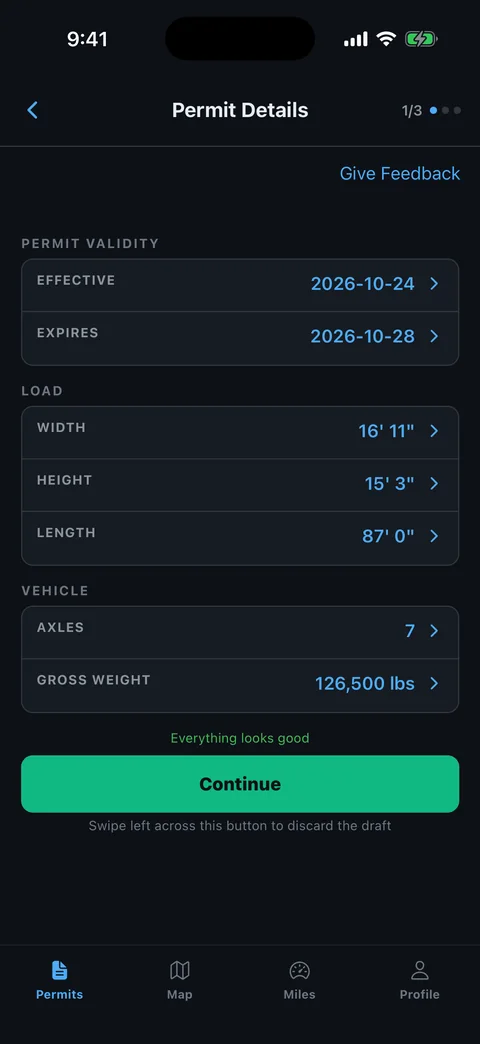
Does The Permit Describe The Load You Will Move?
Compare the South Carolina permit with the loaded vehicle after securement. Match the equipment, cargo description and measured dimensions rather than assuming the application copied them correctly. A change in trailer setup can affect more than the vehicle identifier.
Review the values as a group. Height, width, length and axle arrangement explain different parts of the movement, so checking only gross weight leaves gaps.
- Truck and trailer: Match each printed identifier with the assigned equipment.
- Transport dimensions: Measure the complete loaded combination and any projecting attachments.
- Axle details: Compare every printed weight and spacing with today's configuration.
- Permit period: Check the effective and expiration information against the intended trip.
- Load description: Confirm the named object or commodity matches the cargo.
Use our permit error checklist to document a discrepancy. Ask for issuer instructions before moving with a changed configuration.
Which Roads Does The South Carolina Permit Authorize?
SCDOT's guidelines require oversized loads to use the highway sections selected by the department. Read your issued route as the movement instruction. The truck route map and a navigation app can help you locate roads, but neither should replace the route on the permit.
The official OSOW page provides the truck route map and current road resources. Use those references to investigate the particular roads named, not to create a new route after approval.
- Locate the start: Identify the actual state entry, loading address or permitted beginning point.
- Trace the sequence: Read road numbers, travel direction and every connecting turn.
- Check access: Ask about permission for any segment whose road authority is unclear.
- Locate the finish: Review the final approach, including the turn into the receiving site.
The permitted-route planning guide helps organize these checks while the truck is still parked.
Does The Permit Override A Posted Bridge Limit?
No. South Carolina's movement guidelines say the permit does not waive a road or bridge weight limitation. Compare the route and current restrictions with the actual loaded configuration. Ask the issuer to resolve any conflict before you approach the affected structure.
SCDOT links bridge load restrictions and current road conditions from its permit page. Keep those sources distinct from a general traffic map, which may describe delay without addressing your load's width or weight.
- Structure location: Match the road, direction and affected crossing.
- Restriction type: Identify whether the concern is weight, width, height or closure.
- Permit condition: Find any special operation associated with that crossing.
- Decision: Obtain issuer direction for an apparent mismatch instead of improvising a bypass.
Give your escort the structure location and the resolved instruction. The escort route-sharing guide can help the crew discuss the same trip.
How Do You Handle An Amendment Or A Delayed Move?
Use SCDOT's published amendment resource when you need the issuer to consider a change. The OSOW permit page links the amendment form and current holiday travel restrictions. A dispatch note or a later appointment does not itself change the permit.
Prepare the exact difference before contacting the permit office or ordering service. Include the affected road, vehicle detail or proposed date, and keep the current issued copy available.
- Describe the change: State what the permit says and what the movement now requires.
- Identify timing: Note whether travel has begun and when the document expires.
- Request the process: Ask which amendment or replacement authorization is needed.
- Recheck conditions: Review the entire new route, dates, signature and supporting instructions.
Revisit escort appointments and waiting locations after any change. Our travel-time planning guide explains how to separate permit dates from usable travel periods.
How Can RouteAll Help With A Safehaul Permit?
RouteAll can extract a permit PDF or photo into a route for manual review. With a South Carolina permit, compare that route with the issued road list and keep the signed original and conditions available. A map does not replace the signature or bridge-restriction review.
Use the PDF permit to GPS workflow to inspect the extraction before confirming navigation. Start with a complete, readable file, including every route page.
- Highway sequence: Match the roads in their printed order.
- Connecting turns: Inspect short roads and ramps that can disappear at a wide map zoom.
- Trip boundary: Compare the first and last authorized points.
- Revised copy: Repeat the review after SCDOT issues a correction.
RouteAll does not issue or amend South Carolina permits, sign them for the permittee, or certify that the road accommodates the load. The driver confirms the extracted route.
Check which roads the South Carolina permit authorizes, then follow the oversize permit route turn by turn past every posted bridge.
The Permit Check In One Minute
South Carolina permit reading includes a signature check. Identify the issued authorization, confirm the authorized permittee representative has signed it, and collect every route and condition page. Compare the equipment, measured load and axle figures with the vehicle ready to depart. Follow the highway sections selected for the movement and check current bridge and road restrictions. An overweight permit does not remove a posted limitation. Use the permit office’s amendment process when the configuration, route or schedule needs to change. RouteAll can organize a legible permit into a route for manual review, while the signed permit and its conditions remain available for the driver and haul team.
Before You Roll
Check the South Carolina signature before departure, then compare the selected roads with current restrictions. Resolve a load change or bridge conflict through the issuer.
Further Reading
Sources And Scope
This guide explains how to read the state’s published permit material. Your issued permit and incorporated conditions govern the move. Check the linked agency material for updates.
- SCDOT Oversize/Overweight Permits — Safehaul; route map; current conditions; bridge restrictions; amendment and holiday resources.
- Guidelines For Movement — Revised March 2026 — Authorized representative signature; selected highways; posted limits remain effective; operating provisions.