 RouteAll
New Jersey Permit Reading Guide
Sources Reviewed: October 23, 2026
Read a New Jersey oversize permit by identifying the issued SUPERLOAD category, matching the loaded vehicle, and tracing its approved trip and conditions. Keep ordinary truck-network maps separate from load-specific authorization. Resolve unclear local or facility access with the responsible authority before using the route.
On This Page
Which New Jersey Permit Category Did You Receive?
Read the complete permit category before checking its route. New Jersey handles several operations in SUPERLOAD, and similar-looking paperwork can describe different purposes. The document needs to fit the vehicle, cargo, and movement you are dispatching.
The NJDOT oversize and overweight page identifies SUPERLOAD and separate workflows for single-trip permits, Code 23 trailers, and ocean-borne containers. Do not assume a category used on a previous trip covers this load.
- Category: Match the issued type with the actual operation.
- Carrier: Check the permittee and dispatched vehicle.
- Load: Compare the description and loaded measurements.
- Movement: Identify whether the document describes this particular trip.
If an ocean-container or special-trailer document appears in the packet, read its own scope rather than interpreting its name as general oversize permission. Read annual versus single-trip permits before relying on repeated-use authority.
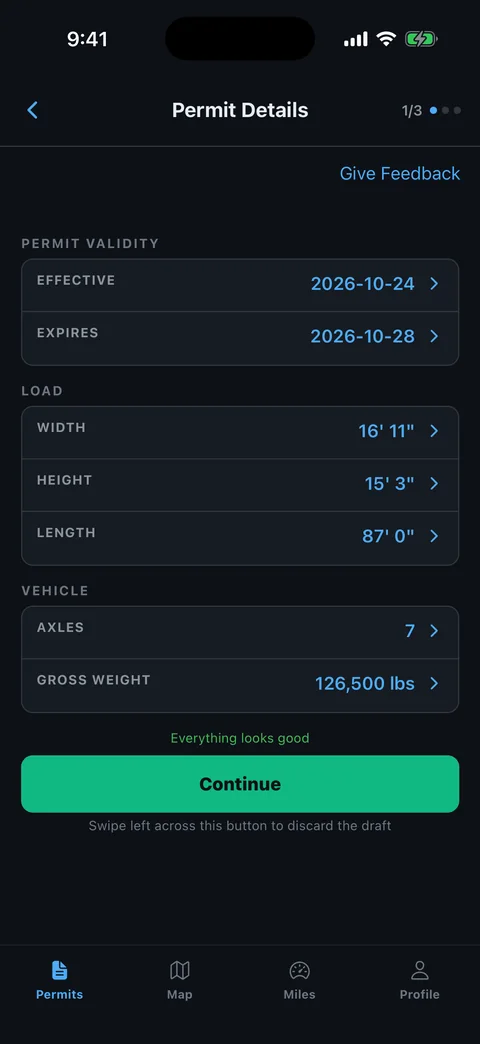
Which Vehicle Details Need Checking in SUPERLOAD?
Compare the issued permit with the departing loaded combination. A saved company profile or previous vehicle entry can help prepare an application, but the issued result still needs to describe the actual move.
NJDOT's SUPERLOAD resource page separates registration, permit ordering, and trip-entry tutorials. Check the issued authorization rather than assuming data entered during one workflow carried correctly into another.
- Power unit: Match the equipment and identifiers stated on the permit.
- Trailer: Check the configuration being used, especially after substitution.
- Dimensions: Compare the loaded combination and projections.
- Weight: Check gross and axle information where provided.
- Dates: Read the permitted period and any movement-specific timing.
Record discrepancies on a separate review sheet. The common permit-error guide helps catch mismatches before the driver leaves the yard. Do not correct the issued document by editing its text.
Is the New Jersey Large Truck Map Your Permit Route?
No. A truck-network map describes a network; the issued oversize authorization describes permission for a particular vehicle or operation. Use the map to investigate the trip, while reading the permit's actual roads and conditions.
The NJDOT truck-routing page describes the National Network, New Jersey Access Network, and local unrestricted roads. Its ordinary large-truck access discussion does not supply load-specific oversize clearance or amend your SUPERLOAD permit.
- Read the permit: Identify the actual origin, destination, and issued roads.
- Trace transitions: Check directions, ramps, and connecting turns.
- Read restrictions: Locate special instructions affecting a section or structure.
- Investigate gaps: Ask the issuing office about an unexplained connector.
Do not replace permit directions with a general “truck route” between the same towns. Read why general maps cannot follow a permit before accepting that shortcut.
Keep two review questions on the movement sheet: whether an ordinary commercial truck may use the road, and whether this permitted load is authorized to use it. A favorable answer to the first does not resolve the second. Ask the office about the specific combination and proposed section when they differ.
For example, a network map may show a road that connects conveniently to the receiver. Before using that connection, compare it with the issued itinerary and any facility conditions. This review should happen before the navigation route is shared, so the crew does not mistake a proposed approach for one already authorized.
How Do You Check Local and Facility Access?
Identify who controls the roads and crossings at the boundaries of your trip. Do not assume one state authorization answers every terminal, local-road, toll-road, or crossing question. Ask about the exact segment if the issued packet does not make coverage clear.
New Jersey's network guidance distinguishes several road networks and terminal-access purposes. That makes it important to keep ordinary access concepts separate from your oversize movement's actual authorization.
- Pickup entrance: Identify the public approach the loaded vehicle will use.
- Delivery entrance: Check the receiver's expected gate and connecting road.
- Crossing: Confirm any separate facility instructions named in the packet.
- Authority: Resolve missing permission with the responsible agency.
Record the final state-authorized road and the next approved section. A gap hidden inside a navigation waypoint remains a gap. Recheck the approach if the receiver changes the gate after the permit was issued.
Which Written Conditions Need a Crew Briefing?
Read the complete issued movement conditions before scheduling the trip. Identify time, route, escort, warning-device, and structure instructions actually assigned to the permit. A valid date range does not describe every condition needed for departure.
Use current issued material and NJDOT's official permit channel when a condition is unclear. Older reference copies should not settle a conflict with the actual authorization or current agency guidance.
- Time: Identify the movement windows applying to the trip.
- Support: Confirm required escorts or coordination.
- Location: Attach special instructions to the road or crossing they affect.
- Equipment: Check the warning devices named in the packet.
Explain what the driver and each escort must do before the relevant section. The pilot-car route-sharing guide helps everyone review one route without losing the written conditions.
How Do You Resolve a New Jersey Permit Error?
Bring the precise mismatch to NJDOT's SUPERLOAD permit office before relying on the affected authorization. Separate a system-access question from a change to the vehicle, load, dates, or road. The office needs the current movement facts to resolve the right issue.
The official NJDOT page provides the SUPERLOAD contact channel. Have the issued packet available rather than describing a problem from memory.
- Name the field: Identify the incorrect item or exact route section.
- Provide current details: Use actual loaded measurements and equipment.
- Explain related issues: Include any changed entrance or facility instruction.
- Keep the outcome: Retain corrected issued material and replace old copies.
Then follow the PDF-permit-to-GPS guide to review readable directions in RouteAll. Manually compare each transition. RouteAll does not issue New Jersey permits or approve route changes.
Drive the roads in the New Jersey permit, not a general truck map; how to follow an oversize permit route covers keeping to the roads SUPERLOAD issued.
The Permit Check In One Minute
For New Jersey, begin by reading the exact SUPERLOAD permit category. Check that the carrier, vehicle, trailer, loaded dimensions, weight information, and dates match the departing combination. Trace the issued route rather than replacing it with an ordinary large-truck network route. Identify the authority for any unclear local, terminal, toll-road, or crossing section. Read the actual movement conditions and brief required escorts before departure. If a field, road, or entrance changes, ask the SUPERLOAD permit office to resolve it and review the resulting documents. Keep older reference material separate from current issued permission. RouteAll can help compare readable permit directions with a map, but the driver must manually verify the route and retain the conditions.
Before You Roll
Confirm the correct permit category and trace the complete issued movement. Resolve uncertain connectors or facility access before navigation, and keep every crew member on the same current packet.
Further Reading
Sources And Scope
This guide explains how to read the state’s published permit material. Your issued permit and incorporated conditions govern the move. Check the linked agency material for updates.
- Oversize and Overweight Vehicles — NJDOT/NJMVC issuing roles, SUPERLOAD, distinct permit workflows and current office channel.
- Truck Routing — National Network, New Jersey Access Network, local roads and ordinary truck-network guidance.