 RouteAll
Virginia Permit Reading Guide
Sources Reviewed: October 23, 2026
Read a Virginia hauling permit together with the structure exclusion lists or locality documents it references. Match the vehicle configuration, route and travel conditions. Virginia now directs permit ordering to EZ Haul; an older VAHPS reference is not a reason to ignore the current issued instructions.
On This Page
Which Virginia Documents Make Up Your Authority?
Read the issued hauling permit with every referenced structure exclusion list or locality document. Virginia DMV's hauling-permit guidance specifically directs blanket permit holders to obtain those references. The main permit is the beginning of the review rather than the entire answer.
Keep the supporting documents in the active trip folder. Label your own working notes with the reference and review date so an escort can follow which document you checked.
- Issued permit: Identify the category, covered configuration and current travel period.
- Route information: Save all route pages and move-specific instructions.
- Exclusion list: Obtain the list named for that permit or weight category.
- Locality document: Read the applicable geographic conditions where referenced.
Use the annual versus single-trip guide to organize a category comparison. Do not equate blanket authority with unrestricted road choice.
What Changed From VAHPS To EZ Haul?
Virginia DMV now directs permit applicants to EZ Haul and links transition guidance from the former VAHPS system. The current official permit page is the starting point for ordering instructions. Read the issued permit rather than assuming an old portal guide describes today's process.
For a driver, the useful task is identifying the current authorization, not remembering the software used to request it. Keep a submitted application, account update and payment record separate from the issued permit.
- Current copy: Confirm dispatch supplied the issued movement document.
- Configuration: Compare the truck, trailer and load the permit covers.
- Referenced material: Collect the exclusions and locality documents named.
- Correction route: Use the official guidance or permit section when something needs amendment.
An account's saved vehicle record is useful for applications, but it does not eliminate the need to compare the details on each issued permit.
Does The Virginia Permit Match Your Configuration?
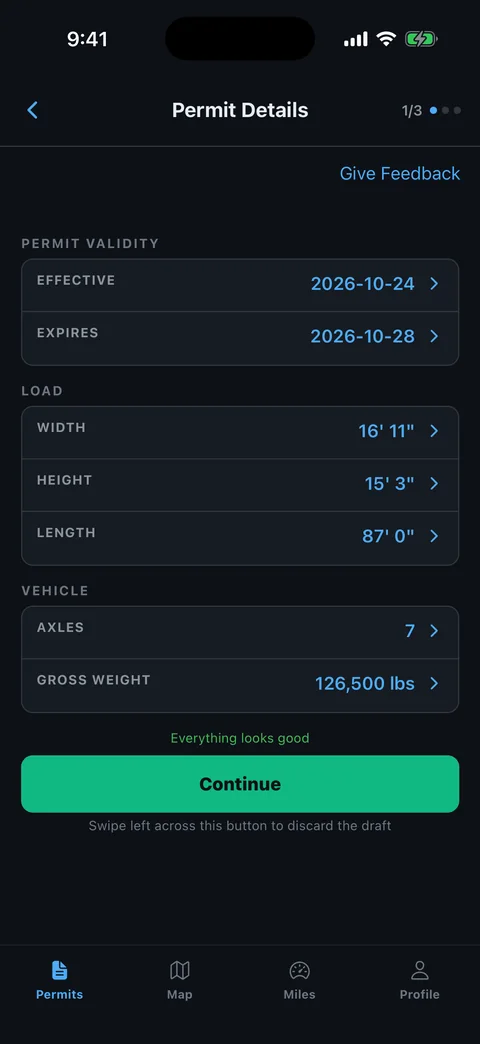
Compare the Virginia permit with the complete vehicle configuration after loading. Check the power unit, trailer, cargo and measured dimensions as distinct items. A correct carrier name or familiar delivery site does not establish that the remaining entries are correct.
Record differences on a separate review sheet. A changed trailer setup can affect height, length, axle distribution and the conditions governing the trip.
- Vehicle identifiers: Match each truck and trailer entry shown.
- Loaded size: Check overall height, width, length and overhang.
- Weight entries: Review gross and axle information rather than only the total.
- Load category: Match the described commodity or equipment with the movement.
- Dates: Read the issued beginning and ending of the permit period.
Our permit errors checklist helps turn a mismatch into a clear correction request. Ask the issuer to resolve changed equipment before travel.
How Do You Use Virginia’s Structure Exclusion Lists?
Use the exclusion list named by your Virginia permit to check the proposed roads and structures. DMV publishes structure exclusion lists and locality documents separately. Match the reference on your permit rather than choosing a convenient list because its title seems close.
Trace the trip and compare the relevant entries with the vehicle configuration you just checked. Retain the full description of a structure or road segment in your working notes.
- Match the reference: Identify the exact list or locality document required.
- Locate the route: Compare roads, direction and named structures.
- Read the condition: Keep the restriction attached to the affected location.
- Resolve uncertainty: Ask the permit section about an apparent exclusion or unclear entry.
Use the permitted-route planning guide to prepare that review. A navigation line through a bridge does not decide whether your blanket authority permits the crossing.
What If A Virginia Route Or Travel Condition Conflicts?
Ask the Virginia permit issuer to resolve a road closure, unclear condition or equipment mismatch before relying on the document. Give the specific road, direction and affected entry. Do not interpret an ordinary traffic detour as permission for an oversize movement.
Prepare the current permit and supporting exclusion or locality document before contacting the permit office or ordering service. That lets everyone discuss the same restriction rather than an abbreviated dispatch note.
- State the conflict: Explain what the permit or reference says and what has changed.
- Supply the facts: Provide the relevant measured load or axle detail.
- Request direction: Ask which amendment, replacement or further authority is needed.
- Recheck the package: Compare the revised route, dates and referenced documents.
The travel-time planning guide helps reassess timing after a change. Update the driver and escort copies together.
How Can RouteAll Help With A Virginia Hauling Permit?
RouteAll can extract the printed route from a permit PDF or photo for manual review. Keep Virginia's referenced structure exclusions and locality conditions beside that route. The app can help organize the roads; it does not decide which separate document grants permission for each segment.
The PDF permit to GPS workflow explains the driver confirmation step. Use a legible complete file and compare the extracted route with the issued document.
- Road sequence: Retain short connectors and the exact order of highways.
- Directions: Check ramps and repeated road numbers carefully.
- Trip endpoints: Match the approved beginning and finish with the planned access.
- Revised authority: Review again after a corrected permit arrives.
RouteAll does not issue or amend Virginia permits or guarantee clearance. Resolve permit questions through the issuer before confirming the extracted route for navigation.
Keep Virginia’s structure exclusion lists beside you as you follow the oversize permit route turn by turn.
The Permit Check In One Minute
Virginia permit reading includes any structure exclusion list or locality document referenced by the issued permit. Begin by identifying the permit category and current configuration. Compare the actual loaded vehicle, dimensions and weights before tracing the route. For blanket authority, obtain the correct supporting list instead of assuming every bridge or locality is covered. Virginia now directs permit ordering through EZ Haul, so start with current official guidance when a correction is needed. Ask the issuer to resolve a closure, unclear exclusion or changed vehicle. RouteAll can turn a legible route document into navigation for manual review, but it does not replace the supporting conditions or grant permission for a restricted crossing.
Before You Roll
Download the Virginia structure exclusion or locality documents named by your permit. Compare them with the route and actual configuration before departure.
Further Reading
Sources And Scope
This guide explains how to read the state’s published permit material. Your issued permit and incorporated conditions govern the move. Check the linked agency material for updates.
- Virginia DMV Hauling Permits — EZ Haul transition; permit content and categories; requirement to obtain referenced structure/locality documents.
- Hauling Permits — Structure Exclusion Lists And Locality Documents — Official reference location for the separate lists and geographic documents.