 RouteAll
Massachusetts Permit Reading Guide
Sources Reviewed: October 23, 2026
Read a Massachusetts oversize permit by matching the issued OASIS authorization to your loaded combination, route, dates, and conditions. Check tunnel and surface-road clearances separately. MassDOT’s Truck Check tools help investigate a trip; their results do not replace the permit or another road authority’s permission.
On This Page
What Should Be in Your OASIS Permit Package?
Begin with the issued permit and the complete route and conditions delivered with it. Keep any related approval or survey material available for comparison. A saved trip, application screen, or shopping-cart receipt does not show the final movement that was authorized.
The official OASIS portal identifies itself as MassDOT's Oversize Overweight Permitting and Routing Application. Its account and support functions are separate from the public Truck Check tools. Confirm which document came from the actual permitting transaction.
- Movement: Match permit type, effective dates, origin, and destination.
- Equipment: Compare the described truck, trailer, and loaded configuration.
- Route: Keep each page of directions and location-specific notes.
- Conditions: Read every referenced requirement before dispatch.
If you receive several files, open them together before accepting the packet. Keep questions about missing material on a short list for dispatch or the permit office.
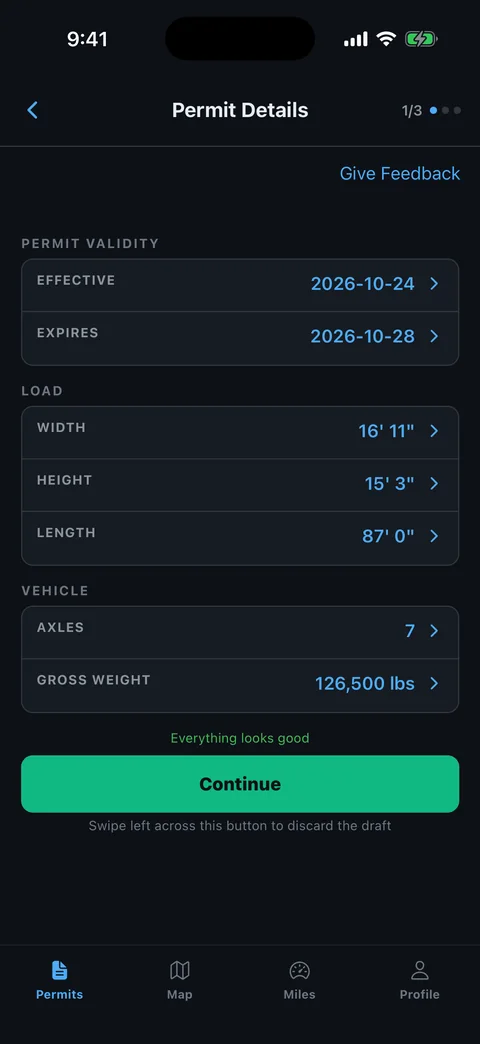
Which Measurements Should You Compare First?
Check the dimensions of the loaded combination, including load-holding devices, before relying on a route. A trailer specification or cargo drawing alone cannot describe the height or overall size of the truck as loaded.
Massachusetts General Laws, chapter 90, section 19 addresses dimensions and the authority to issue special permits. It makes clear that the relevant dimensions include the load and load-holding devices. The issued permit still needs to match your actual movement.
- Height: Measure from the road surface to the highest loaded point.
- Width: Identify the widest part of the combination and cargo.
- Length: Check overall configuration and projecting equipment.
- Weight: Compare the issued gross and axle information where applicable.
Write the current values beside the corresponding fields on a separate review sheet. If they differ, ask for the permitting decision before departure. The state-permit error guide helps organize that comparison.
How Do You Check Massachusetts Tunnels and Restricted Roads?
Identify the exact tunnel and direction of travel on the authorized route, then check its current information. Do not apply one familiar tunnel clearance to every Boston-area crossing. A route name and a nearby road are not interchangeable.
MassDOT's Truck Height Check lists tunnels and selected surface routes separately. It distinguishes facilities such as the Ted Williams, Callahan, and Sumner tunnels and directs users to current Mass511 conditions.
- Find the facility: Match the actual route and direction with the permit.
- Check loaded height: Use the measurement of the departing combination.
- Read conditions: Check current restrictions and the permit's own instructions.
- Resolve differences: Ask the permit office about a conflicting crossing before navigating.
Do not treat a passing height result as approval for weight, width, hazardous materials, or commercial access. Those are different questions. Read why general maps cannot follow a permit before accepting a convenient tunnel shortcut.
Does a MassDOT Permit Cover the Last Street?
Check who controls the roads at both ends of the trip, as well as the major state highway. Massachusetts law assigns special-permit authority to the board or officer responsible for a way, with state and designated through-route provisions.
The distinction appears in chapter 90, section 19. Do not infer that a MassDOT permit resolves every municipal or facility access question. If authority is unclear, identify the road and ask the permitting office which approval applies.
- Origin access: Identify the public road connecting the pickup to the authorized route.
- Delivery access: Trace the final turn and the road into the receiver.
- Facility boundary: Separate public-road permission from private site access.
- Alternate entrance: Recheck authorization if the receiver changes the gate.
Use an exact street and entrance description when asking for clarification. A town name alone can leave the final approach unresolved, especially when different entrances connect to different roads.
What Should You Extract From the Written Conditions?
Turn each movement condition into an action at the place or time where it applies. Read the complete issued instructions before planning the day's driving. A permit's date range does not by itself describe its daily operating window.
Build a short movement brief that keeps the source wording available. Distinguish a general requirement from a note applying to one road, bridge, or tunnel. If you cannot tell which segment a condition controls, ask before the crew reaches it.
- Timing: Identify movement windows and any date-specific limits.
- Escorts: Confirm any required support and its meeting point.
- Structures: Locate instructions affecting a particular crossing or lane.
- Coordination: Identify any calls or arrangements required before movement.
Read the travel-time and curfew guide for the difference between validity and permission to move at a particular hour. Use your issued Massachusetts conditions for the actual decision.
How Do You Correct an OASIS Route or Permit Mismatch?
Bring the exact discrepancy to MassDOT's Truck Permit Office before using the affected authorization. The OASIS portal provides the office contact and a support route. Separate an account problem from a question about what the permit authorizes.
- Identify the document: Have the issued permit available when requesting help.
- Name the field: Describe the wrong dimension, vehicle, date, or route segment.
- Provide current details: Explain the actual loaded combination and intended movement.
- Keep the decision: Retain corrected issued material or the office's instructions.
Do not assume a saved route in an account has updated an already issued permit. Review the resulting authorization itself. After a correction, replace old driver copies and repeat the crew briefing for changed instructions. If another road authority controls the affected section, clarify that part before dispatch too.
How Can You Review Massachusetts Directions in RouteAll?
RouteAll can help you review readable permit directions on a map after you obtain the authorization. Follow the PDF-permit-to-GPS guide and manually check every extracted transition.
Pay particular attention to tunnels, repeated highway numbers, and the final delivery approach. A nearby route with a familiar name can still be different from the issued direction. Compare the map against the original document before starting navigation.
Keep permit conditions and any separate local permission available outside the map. RouteAll does not issue Massachusetts permits, perform MassDOT clearance approval, or amend the OASIS authorization. A navigation correction makes your working route match the document; it does not authorize a different road.
If the permit changes, repeat the import review from the revised issued packet. Give dispatch and escorts the same route version before the truck begins the affected segment.
Watch for Massachusetts tunnels and restricted roads as you follow the oversize permit route turn by turn to the last street the permit covers.
The Permit Check In One Minute
For Massachusetts, start with the issued OASIS permit rather than a saved route or application screen. Compare the actual loaded combination with the authorized dimensions and weight information. Trace every road change, then identify any tunnel and its direction. MassDOT offers separate tools for permit checks and height checks, but those tools do not replace the issued authorization. Confirm the authority for the pickup and delivery streets. Read the permit conditions before estimating travel time or arranging escorts. If a field, crossing, or access road does not match the move, ask the Truck Permit Office to resolve it and retain the resulting documents. RouteAll can help you compare readable directions with a map after you manually verify the route.
Before You Roll
Confirm the exact tunnel or crossing and the authority for the final approach. Resolve differences between your loaded combination, the issued OASIS packet, and current route information before departure.
Further Reading
Sources And Scope
This guide explains how to read the state’s published permit material. Your issued permit and incorporated conditions govern the move. Check the linked agency material for updates.
- Truck Check — MassDOT trip-planning tools, OASIS link, distinction between permit checking and height checking.
- Truck Height Check — Tunnel and surface-route-specific checking and current-condition reference.
- MassDOT Oversize Overweight Permitting and Routing Application — Official portal identity, permit ordering, account/support channels.
- General Laws, Chapter 90, Section 19 — Dimension inclusion and permit authority for state, through-route, and other ways.